Automatic entries
The strategy reads the market in real time and submits orders the moment your configured signal triggers — no clicking, no delay.
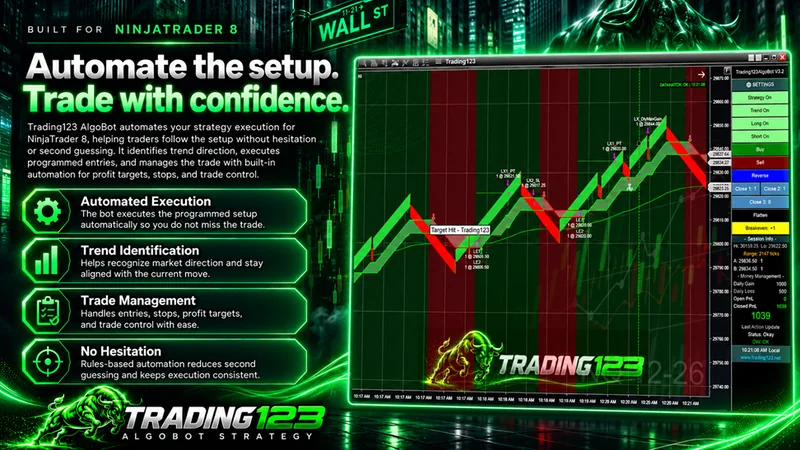
AlgoBot is an automated trading bot for NinjaTrader 8, built on native NinjaScript. It identifies entries, submits orders, and manages stops, trailing stops, and targets automatically.
Trading123 – Indicators & Strategies since 2004
for NinjaTrader 8
From signal to fill to exit, every step of your automated trading is handled through NinjaTrader's Advanced Trade Interface for speed and precision.
The strategy reads the market in real time and submits orders the moment your configured signal triggers — no clicking, no delay.
Stops, trailing stops, and profit targets adjust automatically as price moves — locking in gains and protecting capital in real time.
Every signal, order, and stop adjustment routes through NinjaTrader's Advanced Trade Interface for maximum execution speed.
Run your trading strategy against historical data and stress-test it under volatile conditions before risking a single dollar live.
Automated position sizing and stop-loss / take-profit logic keep every trade inside your defined risk parameters.
Every entry and exit follows your predefined rules exactly — no second-guessing and no impulse trades, just consistent, systematic automated trading.
Import the strategy and indicators into NinjaTrader 8 using the included step-by-step guides and setup videos.
Pick your market and contract, set your risk, targets and trailing rules for your trading strategy, then backtest until you're confident.
Turn the strategy on and AlgoBot handles entries, exits, stops and trailing in real time — hands-off.
One purchase gets you everything required to install, configure, and run this automated trading bot on NinjaTrader 8 — plus ongoing support and free updates for the lifetime of your license. New to bots? See our guide to running automated bots.
Get instant accessThe AlgoBot strategy
Native NinjaScript for NT8
Custom indicators
Signals the strategy runs on
Manuals & guides
Install and configuration docs
Step-by-step videos
Watch the full setup
Ongoing support
Help when you need it
Free lifetime updates
Refreshed twice a year
Rithmic Data Feed Watch
Broker-level auto-flatten safety
Discord community
Members-only access & support
See automated trading strategies at work: NQ trades from entry to exit, with the strategy handling the entry, stop, profit target and trailing stop while you watch.
Click the chart to enlarge.
Click the chart to enlarge.
Click the chart to enlarge.

As part of automated trading, an automated strategy is only as good as the data feeding it. If your connection cuts out mid-trade, a bot can be left holding a position it can no longer see or manage — unable to move a stop, unable to take a target. Technical failures like this can lead to missed trades or losses when the system loses visibility.
Data Watch is built into AlgoBot to prevent exactly that. It monitors your data connection continuously, and the moment that connection is lost, it flattens your position automatically — closing you out rather than leaving an unmanaged trade open in a market you can't see.
A single payment unlocks the full AlgoBot package — no subscriptions, no renewals, free updates forever.
Limited-time price — no monthly or yearly fees, ever.
Instant download · Secure checkout
New license system — no Machine ID needed. We use a Unique ID for licensing that never needs updating.
We use PayPal & Stripe to safely process payments (all major credit & debit cards accepted).
An automated trading bot is software that places and manages trades for you by following a fixed set of rules, instead of you clicking buy and sell. AlgoBot is an automated trading bot for NinjaTrader 8: it identifies entries, submits orders, and manages stops, trailing stops and profit targets automatically, using the settings you choose. For more background, read our guide to automated trading on NinjaTrader 8.
On NinjaTrader 8, an automated trading bot runs as a NinjaScript strategy. It reads your real-time data feed, checks its rules as the market moves, and sends orders to your connected brokerage or SIM account. AlgoBot routes every signal, order and stop adjustment through NinjaTrader's Advanced Trade Interface (ATI). You choose the market, risk, targets and trailing rules, then enable the strategy and it manages the trade for you.
It runs on NinjaTrader 8 using native NinjaScript — the same automated-strategy framework professional developers use. You'll need NinjaTrader 8 installed and a connected data/brokerage feed.
Instantly. After checkout you get a download with the strategy, indicators, manuals and videos, plus your license details — so you can install and start testing right away.
The strategy is designed for the major futures markets — NQ, ES, YM, RTY, GC and CL — and is built for day trading, with configurable entry, stop, trailing-stop and profit-target settings to fit your risk and session.
NinjaTrader 8 installed, a real-time data feed, and a connected brokerage or SIM account. That's it — import the strategy, configure your inputs, and you're ready to test or trade.
No monthly or yearly renewal fees. It's a one-time license, and updates are provided free for the lifetime of your license — the software is refreshed about twice a year.
Yes — and we strongly recommend it. Run the strategy on a simulated (SIM) account in NinjaTrader 8 for at least a few weeks before going live. Trading in SIM lets you learn the settings, see how it behaves across different market conditions, and build confidence with zero financial risk. You can also backtest it against historical data to stress-test it further. Only move to a live account once you're consistently comfortable with how it performs in SIM.
It's a built-in safety system, included at no extra cost, that runs on an independent timer while you're in a trade. If your Rithmic data feed stalls, freezes, or disconnects, it triggers an Account Flatten at the broker level — closing your position straight through the broker even when the chart is frozen and chart-managed stops can't fire.
Yes. Automated trading removes manual clicking and emotion, but it does not remove market risk, and no bot can guarantee profits. We recommend backtesting and running the strategy on a SIM account for several weeks before going live, and sizing every trade to your own risk limits. AlgoBot also includes Data Watch, which flattens your position automatically if your data connection is lost.
Get the AlgoBot automated trading bot for NinjaTrader 8 today — install in minutes, backtest your trading strategy with confidence, and automate your edge.
Get the AlgoBot